Draw, develop, and present ideas —
together.
Everyone draws at once on the same surface — in the classroom, in the meeting, on site. No internet? You keep working. And at the end you can prove what you agreed on.
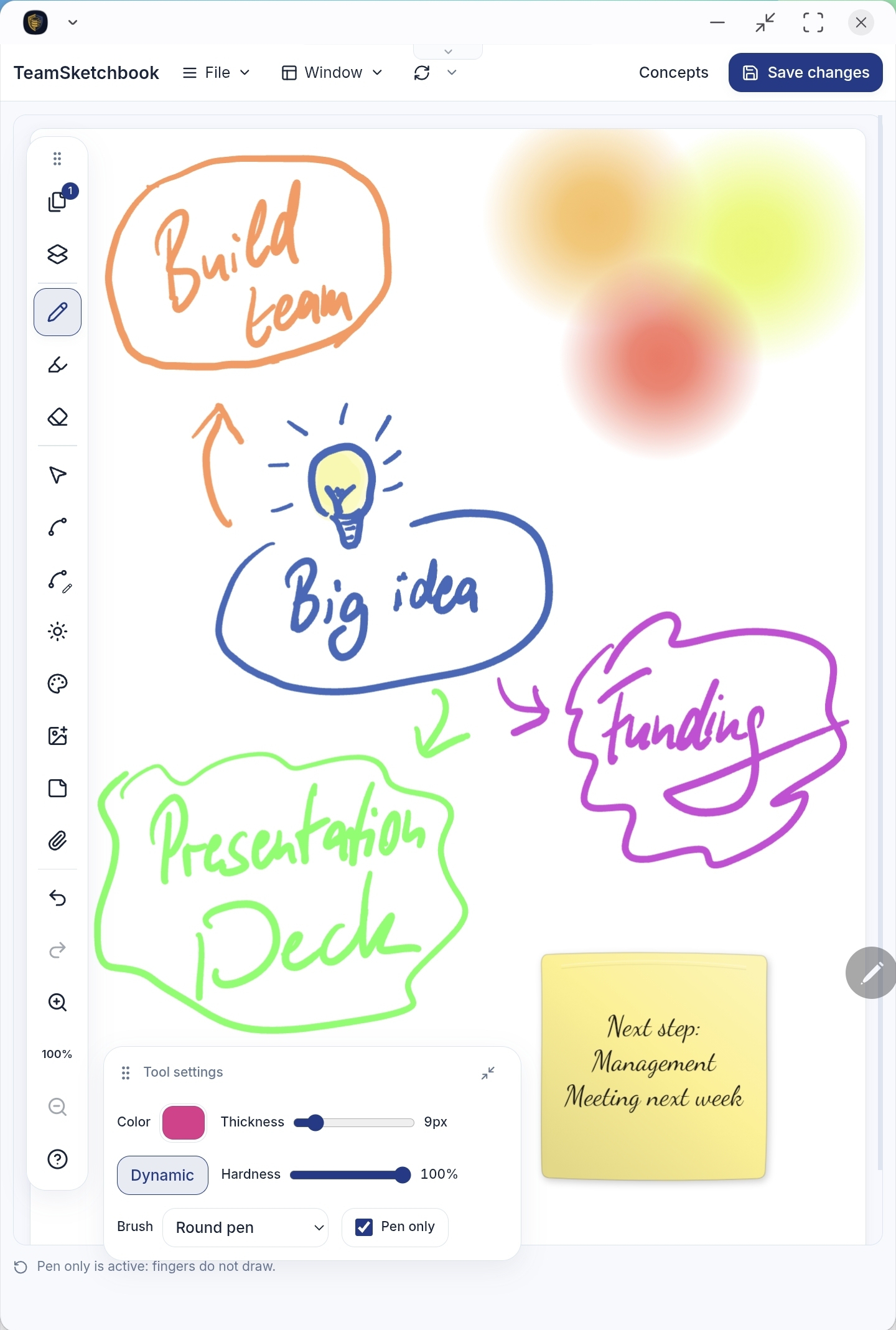
Any app can draw. The rest is the difference.
Keep working offline, prove a sign-off, compare versions, present to the room — all in one app, with no detour through a second tool.
The room never stops.
Keep drawing without a network
A whiteboard in the browser stalls the moment the wifi drops. Here everyone keeps drawing on their own device, and once the connection is back the work merges without conflicts — nobody reconciles versions by hand.
Learn more →Approval you can prove.
Seal what you agreed
Sign off a page or a whole book, then hand out a file that an auditor, insurer, or lawyer can check on their own machine — no account, no keys, no network.
Learn more →Approve with confidence.
Compare what changed
Every page keeps every state it has been in — nothing is overwritten. Put any two of them side by side, or slide one across the other, and spot the diff before you sign off.
Learn more →Your book is the deck.
Present without marking
Go fullscreen and point with a laser instead of a pen — walk the room through student work or client mockups without drawing over them.
Learn more →Book pages or an infinite canvas
Choose the surface when you create a document — File ▸ New sketchbook or File ▸ New canvas. Both share the same tools, collaboration, history, and encryption.
Sketchbook
Pages you can flip through.
A multi-page book with standard paper sizes — A4 and more, portrait or landscape. Perfect when you need a finished document: notes, worksheets, forms, and imported PDFs or GoodNotes notebooks.
Infinite canvas
One surface that never runs out of room.
An unbounded space that grows in every direction. Pan, zoom, and fit everything to screen — ideal for brainstorms, mind maps, and thinking big without page breaks.
Two ways to collaborate
Shared canvas
Everyone draws on the same page. Ideal for co-creation, workshops, and a whole class working on one shared surface. Once someone saves, their changes appear on your page by themselves — including whatever they drew while offline.
Shared book, own pages
Each participant gets their own page inside one shared book — great for student worksheets and team status pages. And every change is signed by its author.
See it in action
An architect’s plan with feedback, the original file riding along at full resolution to preview or download. Plus handwritten meeting minutes, a traced photo, wireframes for an online shop — and one very serious pineapple-on-pizza pro and con list. All from the same toolbox.
Every page remembers everything
Each page keeps its complete edit history from the very first stroke. Storage is append-only: changes are added, never overwritten — so nothing anyone draws, erases, or deletes is ever truly lost.
- Nothing is ever overwritten. Every change is appended with date and author, signed and encrypted.
- Open the book — or a single page — exactly as it was at any point in time, back to the day it was created.
- Or rewind everything at once. Haven can launch TeamSketchbook with a time travel date — read-only, with every sketchbook back in that moment, not just a single page.
- Concurrent edits merge cleanly. When an Android Tablet and an iPhone change the same page at once, AutoMerge produces one consistent image — and the change graph shows what each device saw locally when it applied its change.
- Copy elements from the past into your current page — recover an erased sketch or a deleted idea.
- And you can hold any two of those moments up against each other — more on that just below.
And because you can open any earlier state, the history becomes a playground too: build a scavenger-hunt quiz book where clues hide in the past — “find the next hint yesterday at 12:00 on page 40!”
Click for the change graph and a scrub through this page’s history.
Compare any two pages
Assign pages to slots ① and ② — same book or different open books, today’s draft or a historical revision — then open Compare. Slot ① is always the read-only reference; slot ② stays editable when it is the live current version.
Practical for design reviews, architecture mark-ups, teaching (draft vs. answer key), and any workflow where “what changed?” matters more than scrolling history alone.
Your sketchbook is the deck
Switch to a distraction-free Presentation mode straight from the Window menu — no export, no second app.
- Flip through pages like a deck, or pan and pinch-to-zoom around an infinite canvas.
- Point with a laser pointer — a glowing highlight with a short trail, so the work you present stays untouched.
- Attach hyperlinks to strokes and images for external references.
- Embed and preview files inline — video, audio, images, and Word documents.
- Changes your collaborators save keep appearing while you present.
You don't need to be able to draw
TeamSketchbook is for anyone who has to explain something, agree on something, or put it on record — in the classroom, in a meeting, or on a building site. A few strokes and a sticky note are enough.
From first idea to signature
Team brainstorming
An infinite canvas — on your own, to sort out your own thoughts, or a shared surface the whole team works on. You can write and draw on sticky notes, so scattered ideas become groups you can move as one.
Design & document review
Put two pages side by side or under a slider — live draft or a past revision. Spot what changed before you approve.
Live presentations
Show pages like slides, or pan freely across the canvas. Point with the laser pointer instead of the pen, put links behind strokes and images, and open embedded files straight from the presentation.
Classroom & training
One shared surface or a page of their own per learner. Stickies collect feedback; laser present without marking student work.
PDF mark-up
Import a plan, contract, or proposal and write on it together. Sticky notes pin a comment to exactly the spot it is about; the history keeps every signed change.
Offline field work
Fill templates and sketch on site with no signal. Everything syncs when you reconnect.
Sign-off & audit trail
Seal an agreed page, have the other side counter-sign, and export an evidence file that stands on its own — a third party can check it without your keys.
Seal a page. Prove it later.
Six months on, someone says: “that is not what we agreed.” If all you have is a drawing, you have nothing. Sealing pins the exact state you approved, has everyone involved sign it, and has the date confirmed by an independent authority. Out comes a single file — the other side checks it on their own machine, with no account, no internet, and no need to trust us.
- Seal a page or the whole book. What is kept is the exact state you approved, down to the last stroke — not “the latest version”, which looks different again tomorrow.
- As many signatures as the decision needs. Everyone involved signs the same approval — or counter-signs an older one to put on record: seen and agreed.
- An outsider confirms the date and time. An independent time service certifies the seal, so the moment rests on neither your clock nor ours — and it can be an eIDAS-qualified authority where the process demands it. (Technically: an RFC 3161 timestamp.)
- Marked in the history. Every seal shows up as a marker in the revision slider — one move and you are back at the exact state that was approved.
- Exportable as evidence. One ZIP with the drawing, every signature, the timestamps, and a small checking tool that runs in a browser — no internet needed.
What the recipient sees
- Unchanged since it was sealed. Every stroke matches what was signed.
- Two signatures, both valid. Made with the keys the record names.
- Existed no later than 3 March, 14:22 UTC. Confirmed by an independent timestamp authority.
- Who those keys belong to. No file can settle that — the parties agree it between themselves. To help, the bundle includes an extract from the address directory.
The verifier reports what it could not check as plainly as what it could. A tool that only ever says “valid” is not evidence.
Work where there is no network
Three people on a building site with no signal: everyone keeps drawing on their own device as if nothing had happened. Back at the office that evening it all comes together — no prompt asking which version wins, and nobody redoing someone else’s work.
Days without a connection
Every device carries a complete copy of your books, so you can work as long as you like with no connection. Nothing has to be checked out or prepared first.
When two people edit the same page
Both sets of strokes survive. No dialog asks which version to keep, and nobody stitches two copies back together afterwards.
Templates
Start with “New from template” for anything that looks the same every time — forms, timesheets, lesson plans, storyboards.
Built on MindooDB
TeamSketchbook runs on an end-to-end encrypted, local-first sync database. The keys stay on your devices; servers only store and sync encrypted data they cannot read. Technical details and the full documentation live at mindoodb.com.
End-to-end encrypted
Your books are encrypted on your device. No one — not even us — can read them without your keys.
Signed per author
Every change is cryptographically signed, so the revision history is tamper-evident — and can be handed to an outsider as evidence.
You choose where it lives
Use our hosting, run your own MindooDB server, or stay fully local-first and offline.
Bring in what you already have
PDFs, GoodNotes notebooks, photos, spreadsheets, video: it all goes onto the page, stays viewable there, and can be handed on as the untouched original. And it all comes back out as PNG, SVG, or PDF.
PDF & GoodNotes import
Bring existing documents in to annotate or use as a base for your sketch — including GoodNotes notebooks, whose handwriting arrives as strokes you can still edit.
Drag & drop
Drop files and images straight onto the page or canvas from your desktop.
The original rides along
Attach the full-resolution original to a page or an image. Collaborators download it whenever they need the real file, without leaving the page.
Rich previews
Attached files open right on the page — Word documents, PowerPoint slides, Excel workbooks with a sheet picker, PDFs, images, audio, Markdown, CSV. Video streams as it plays instead of downloading first. You can show any of it to the room without Office and without leaving the page.
What the camera recorded
Open image details for time taken, lens, exposure, stored size, and GPS coordinates with a link that opens the location on a map. Or choose “Remove GPS location” as you insert the photo — the camera and date are still kept.
Export & tiled print
Export a single page or the whole book as PNG, SVG, or PDF at actual size — with everything underneath: imported PDF pages, photos, the paper type. Or tile an infinite canvas across A4, A3, or Letter sheets with a 1 cm glue overlap and numbered arrows showing which sheet goes on top.
Draws like paper, edits like software
Pressure-sensitive pens, editable curves, layers, sticky notes, and lights behind the paper — all in one tidy rail. And every stroke stays an object: move it, recolor it, smooth it, or group it weeks later.
Pen & Marker
Dynamic pressure, adjustable hardness, brush styles, and translucent highlighters. Pen-only mode ignores palm and finger touches.
Spline & Edit spline
Draw smooth, editable curves — then drag, add, or remove knots to reshape them precisely.
Select
Move, resize, restyle, flip, smooth, bring to front or send to back, group under a name, and change the transparency of strokes and images.
Sticky notes
Drop a pastel sticky, type a title with alignment and font style, then switch to the pen — your strokes stick to the note and travel with it.
Layers
Add, rename, reorder, show, and hide named drawing layers. Draw and select on the active layer so corrections stay where you intend.
Light
Place colored lights on the page — where they overlap, the colors blend into new gradients every time. As a glow behind the paper, or as a lens flare over a photo.
Page properties
Paper types — blank, lined, squared, dotted, Cornell, columns, music staves, coordinate grid — plus paper color and portrait or landscape.
Insert image
Add images from your photo library, camera, or files, then paint over them to move, resize, or rotate.
Attach file
Attach any file — drag it onto the canvas or use the paperclip. Preview, download, or share attachments.
Navigate
Buttery zoom, a page-navigator minimap, undo / redo, and contextual help that explains every control.
Little touches that make it a joy
The right paper for the job, light that makes the page glow — and a few small things you would not expect.
One canvas, every device
Web & PWA
Runs in any modern browser. Install it like an app.
Tablet, pen-first
Built for stylus input with pen-only mode.
Desktop
Windows, macOS, and Linux.
Offline everywhere
Local-first — no connection required.
Available in 8 languages: English · Deutsch · Français · Español · Italiano · Nederlands · Norsk · Polski
Get started in four steps
- 1
Open Haven
Go to haven.mindoodb.com in your browser.
- 2
Create your user ID
Enter a name and organization to create your personal identity.
- 3
Create your first tenant
Choose a tenant ID — your private space for books and collaborators.
- 4
Install TeamSketchbook
Open “Applications” and install TeamSketchbook from the Haven App Store.
Good to know
What's the difference between a sketchbook and a canvas?
A sketchbook is a book of fixed pages with standard paper sizes (A4 and more) — ideal for notes, forms, and PDFs you want to print or export at 1:1. An infinite canvas is one unbounded surface you can pan, zoom, and fit — ideal for brainstorms, mind maps, and big-picture work. Pick the mode when you create a document: File ▸ New sketchbook or File ▸ New canvas.
How do I print an infinite canvas?
The print dialog tiles the canvas across standard sheets (A4, A3, or US Letter) with a 1 cm glue overlap on the right and bottom of each sheet. A live preview shows the layout and sheet count, and small arrows mark which neighbouring sheet to glue on top — so you can assemble a wall-sized result.
Does it really work offline?
Yes. TeamSketchbook is local-first — you can draw, annotate, and fill templates with no connection. Changes queue locally and sync automatically once you're back online.
Is it free?
The app itself is free to use — run your own MindooDB server or work entirely local-first and offline at no cost. If you'd rather not host anything, MindooDB Cloud gives you a private, end-to-end encrypted cloud for TeamSketchbook and every other Haven app at €7.99 per user per month, €79.99 per year, or team packages from €349.99 for 5 users per year — 10, 15, 20 users and up on request (incl. VAT), with 200 GB of storage per user included (more available on request). See pricing for details.
Can I go back to an earlier version of a page?
Always. Every page keeps its complete edit history from the very first stroke — storage is append-only, so changes are added rather than overwritten. Open any past state of a page or the whole book, copy elements from it into your current draft, or compare it against today's version. Even erased or deleted content can be recovered. And Haven goes one step further: launch TeamSketchbook with a time travel date and the whole app opens read-only as it was then — every sketchbook at once, not just one page.
Who can see my sketchbooks?
Your data is end-to-end encrypted by MindooDB — the keys stay on your devices, and servers only store and sync encrypted data they cannot read. You control who is invited to a book.
Can I present without extra software?
Yes. Switch to Presentation mode from the Window menu. Use the laser pointer to highlight without marking the page, add hyperlinks to strokes and images, and preview embedded files (video, audio, images, Word documents) live.
How does page compare work?
Assign any two pages to slots ① and ② — from the same book or different open books, current draft or a historical revision — then open Compare. Choose side-by-side or a slider overlay. Slot ① is always the read-only reference; slot ② stays editable when both sides are the live current version.
What can sticky notes do?
Place a sticky, type a title with alignment, pick a fill color, then switch to the pen — new ink attaches to that note and moves with it. Changing the selection color updates the sticky text and attached strokes together.
Can I import PDFs and export my work?
Yes. File ▸ Import takes a PDF or a GoodNotes notebook, lets you pick the pages you want, and adds them to a book — to annotate or to build on. Going the other way, File ▸ Export gives you a single page or the whole book as PNG, SVG, or PDF at 1:1. What you get is the finished page, not just your strokes: annotations, images, and the background they sit on — an imported PDF page, a photo, the paper type — come out together. SVG stays vector, so it can be edited elsewhere. A whole book arrives as one PDF, or as a ZIP of pages for PNG and SVG.
What comes across when I import a GoodNotes notebook?
Your handwriting, as editable strokes: pen, ballpoint, pencil, and highlighter keep their color and pressure, so imported notes can be recolored, erased, moved, and selected exactly like ink drawn in TeamSketchbook. Each page keeps the paper it was written on as its background. Typed text, images, and shapes are not imported. Export a .goodnotes file from GoodNotes, choose File ▸ Import, and pick the pages from the previews.
Does collaborating with a team cost extra?
No. Collaboration is built in. Invite people to a shared canvas, or give each person their own page in a shared book. Everyone can keep drawing offline; the edits merge without conflicts once they sync.
What does it mean to seal a page?
Sealing records that a specific person approved a specific state of a page or book. It captures the exact content — not "the current version" — signs it with your key, and has an independent authority timestamp it. The seal then appears as a milestone on the revision timeline, and you can export it as a file for someone outside your organization to check. See how verification works.
Can more than two people sign?
Yes, there is no limit. Several people can co-sign the same approval, which records that they all agreed to one identical statement. Someone can also counter-sign an existing seal later, which records that they reviewed that earlier approval and endorsed it. Both are exported together, so the full chain of who agreed to what is visible in one file.
How does this relate to eIDAS and qualified signatures?
A seal always gives you cryptographic evidence: proof that the content has not changed since it was signed, that the signatures were made with specific keys, and that the seal existed no later than the timestamped moment. As included, seals are timestamped by an independent public authority — genuine third-party evidence, but not qualified in the eIDAS sense. The timestamping authority is a configuration setting, so it can point at an eIDAS-qualified provider instead, which gives the timestamp a legal presumption of accuracy; that is priced as an add-on, since the qualified service is itself a paid subscription. A full qualified electronic signature is a further step, requiring a qualified certificate issued to each named signer. See qualified trust services.
What does the recipient need in order to verify a seal?
A browser. The exported ZIP contains a self-contained verifier that runs entirely on their machine with no network access, no account, and no keys from you. It reports each claim separately — whether the content is unaltered, whether every signature is valid, and what the timestamp proves — and it says plainly which claims it could not check rather than returning a single green tick.
Does the evidence file reveal our whole workspace?
No, and you decide how much it reveals. The lightest option is a flat picture of the approved page with the signatures over it. The fullest option includes the signed change history, which lets the recipient rebuild the drawing themselves and confirm it matches — but that also reveals strokes you erased along the way, so the app warns you before you choose it. Nothing outside the sealed pages is ever included, and no decryption keys leave your device.
Start your first sketchbook — free.
Open Haven, create your space, and install TeamSketchbook from the App Store.